The FIFINE AmpliGame A8 USB Gaming Condenser Microphone review is for gamers and home creators weighing easy desk controls against the positioning and pickup habits a condenser mic calls for.
Its combination of tap-to-mute, a gain knob, headphone monitoring, and controllable RGB makes it a practical choice for a PC or PS5 setup.
AmpliGame A8 Review Summary
The quick verdict
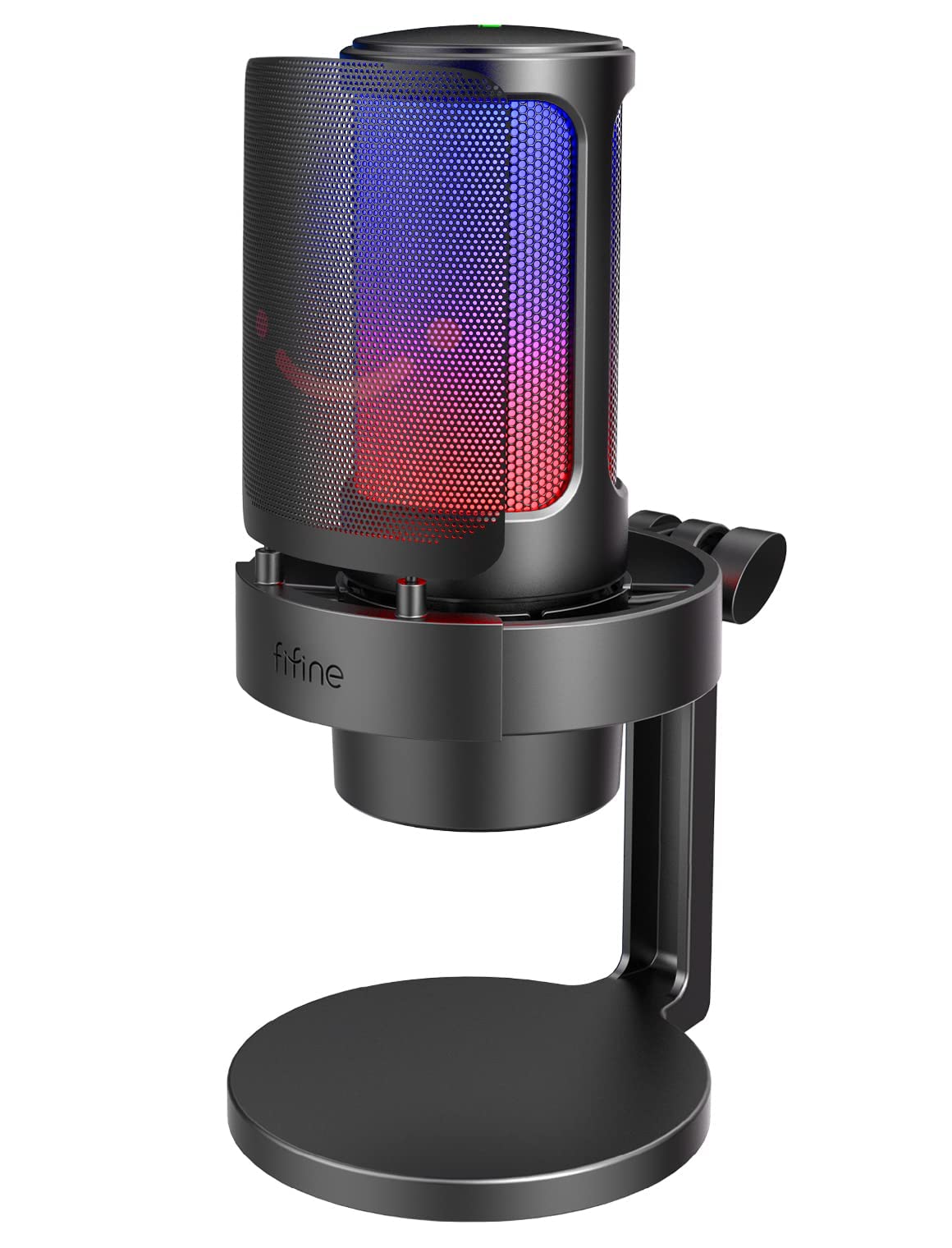
2,000+ ratings
Read Amazon ReviewsFIFINE AmpliGame A8
A fit for gamers and home creators who want simple USB setup, hands-on audio controls, headphone monitoring, and customizable RGB lighting.
- USB plug-and-play setup for PC, Mac, and PS5.
- Condenser capsule with a cardioid pickup pattern for vocal use.
- Gain knob, one-tap mute, and a 3.5 mm headphone monitoring jack.
- Three RGB lighting modes with up to nine colors.

Pros
- Gain and mute controls are available directly on the microphone.
- Headphone monitoring can help you notice whether your voice level or tone needs adjustment.
Consider before buying
- The suggested 6-to-12-inch recording distance requires deliberate placement, which may take adjustment if you tend to lean back while gaming.
- Its supplied stand is intended for desktop use; buyers who need a different mounting arrangement should check how they plan to position it before choosing.
Read the full review summary
The AmpliGame A8 brings several useful controls onto the microphone itself: a gain knob, a one-tap mute, a headphone jack for monitoring, and RGB mode and color selection.
Its condenser capsule is described as sensitive to quieter vocals, while the cardioid pattern is designed to focus pickup toward the speaker and reduce much of the fan or vent noise from a PC tower.
This USB microphone is aimed at gaming chat, streaming, meetings, and home recording on a PC, Mac, or PS5.
The included pop filter and compact shock mount address plosives and some desk vibration, and the stand gives it a ready-to-use desktop format.
It suits people who value visible controls and an uncomplicated setup, provided they can keep the mic at the suggested speaking distance.
The buying factors
AmpliGame A8 Scorecard
Editorial scores reflect listed features and buyer fit; they are not laboratory measurements or customer ratings.
On-mic controls
A gain knob and one-tap mute make common adjustments accessible at the mic.
Monitoring convenience
The 3.5 mm headphone jack supports listening for audio that seems too quiet or harsh.
Voice-focused design
The sensitive condenser capsule and cardioid pickup pattern are suited to close vocal use.
Noise accessories
A pop filter and compact shock mount are included to address plosives and some vibration.
Lighting customization
Three modes offer up to nine RGB color options, selectable with a control button.
Desktop flexibility
The stand's thumbscrew allows position adjustment, though the design is centered on desktop placement.
Key Features and Specifications of AmpliGame A8
- USB plug-and-play setup for PC, Mac, and PS5.
- Condenser capsule with a cardioid pickup pattern for vocal use.
- Gain knob, one-tap mute, and a 3.5 mm headphone monitoring jack.
- Three RGB lighting modes with up to nine colors.
- External black metal pop filter and compact shock mount.
- Desktop base stand with an adjustable thumbscrew for positioning.
- Suggested recording distance is 6 to 12 inches.
Pros and Cons of AmpliGame A8
Pros
- Gain and mute controls are available directly on the microphone.
- Headphone monitoring can help you notice whether your voice level or tone needs adjustment.
- The pop filter and shock mount address two common annoyances in desk recording.
- RGB controls provide several lighting choices for a gaming desk.
Consider before buying
- The suggested 6-to-12-inch recording distance requires deliberate placement, which may take adjustment if you tend to lean back while gaming.
- Its supplied stand is intended for desktop use; buyers who need a different mounting arrangement should check how they plan to position it before choosing.
- RGB lighting and visible controls may be unnecessary if you prefer a plain, low-visibility microphone.
Who Should Buy AmpliGame A8?
Good fit
Consider the AmpliGame A8 if you want a USB microphone that is ready for a PC, Mac, or PS5 and lets you mute or change gain without reaching for computer controls.
The headphone jack also gives you a direct way to monitor your voice while adjusting your setup.
It is a sensible fit for gaming chat, streaming, and casual home recording when you can keep the microphone close and speak within its suggested distance.
The included pop filter and shock mount add practical help for plosives and desk contact, while the stand keeps the package oriented toward a desktop workspace.
Who should skip it
Look elsewhere if your setup depends on a mounting arrangement other than the supplied desktop stand and you cannot confirm a workable fit.
The suggested close speaking distance may also be inconvenient if you need to place the mic well away from you.
If you have no use for on-mic controls, headphone monitoring, or RGB lighting, the A8's feature mix may not match your priorities.
FIFINE AmpliGame A8 USB Gaming Condenser Microphone review: what its design means
Close placement and voice pickup
The suggested 6-to-12-inch range is a useful starting point for arranging the mic relative to your chair and screen.
The cardioid pattern is designed to favor sound from the front and reduce much of the noise from a PC tower's fans or vents, but room position still matters: place the mic toward your voice and avoid leaving it far off to the side.
Controls during a session
The gain knob and one-tap mute keep two frequent tasks within reach.
The headphone jack adds a way to listen for a voice level that feels too low or a sound that seems harsh, giving you a chance to adjust before continuing a stream or recording.
What the included accessories address
The external pop filter is intended to soften plosive sounds such as B and P, while the compact shock mount dampens some vibration from keyboard activity or touching the desk.
These additions are useful for a close desktop setup, though they do not remove the need to place the microphone thoughtfully.
A desk-focused setup
The base stand and adjustable thumbscrew are built around desktop positioning, and the base is described as solid.
Before buying, consider the space available beside your screen and whether that format lets you keep the mic close enough while leaving room for keyboard and mouse movement.
Alternatives to AmpliGame A8
No alternative model is recommended here. Compare microphone placement, controls, and included accessories with your routine before choosing another option.
Is AmpliGame A8 Worth It?
The FIFINE AmpliGame A8 is worth considering for gamers and home creators who want a straightforward USB desktop microphone with accessible gain and mute controls, headphone monitoring, and customizable lighting.
Its pop filter and shock mount add useful support for desk recording.
The main buying check is fit: plan for a desktop position that keeps the mic within its suggested 6-to-12-inch range.
If that works for your setup, the A8 offers a focused mix of convenient controls and practical recording accessories.
Your review at a glance
2,000+ ratings
Read Amazon ReviewsFIFINE AmpliGame A8
A fit for gamers and home creators who want simple USB setup, hands-on audio controls, headphone monitoring, and customizable RGB lighting.
- USB plug-and-play setup for PC, Mac, and PS5.
- Condenser capsule with a cardioid pickup pattern for vocal use.
- Gain knob, one-tap mute, and a 3.5 mm headphone monitoring jack.
- Three RGB lighting modes with up to nine colors.