The SABRENT USB 3.0 Universal Docking Station review is for laptop and tablet users who want one connection point for displays, wired networking, peripherals, and charging.
Its mix of HDMI and DVI outputs, Ethernet, and four USB ports is useful for a desk setup, though the macOS display note makes compatibility worth checking before purchase.
SABRENT DS-RICA Review Summary
The quick verdict
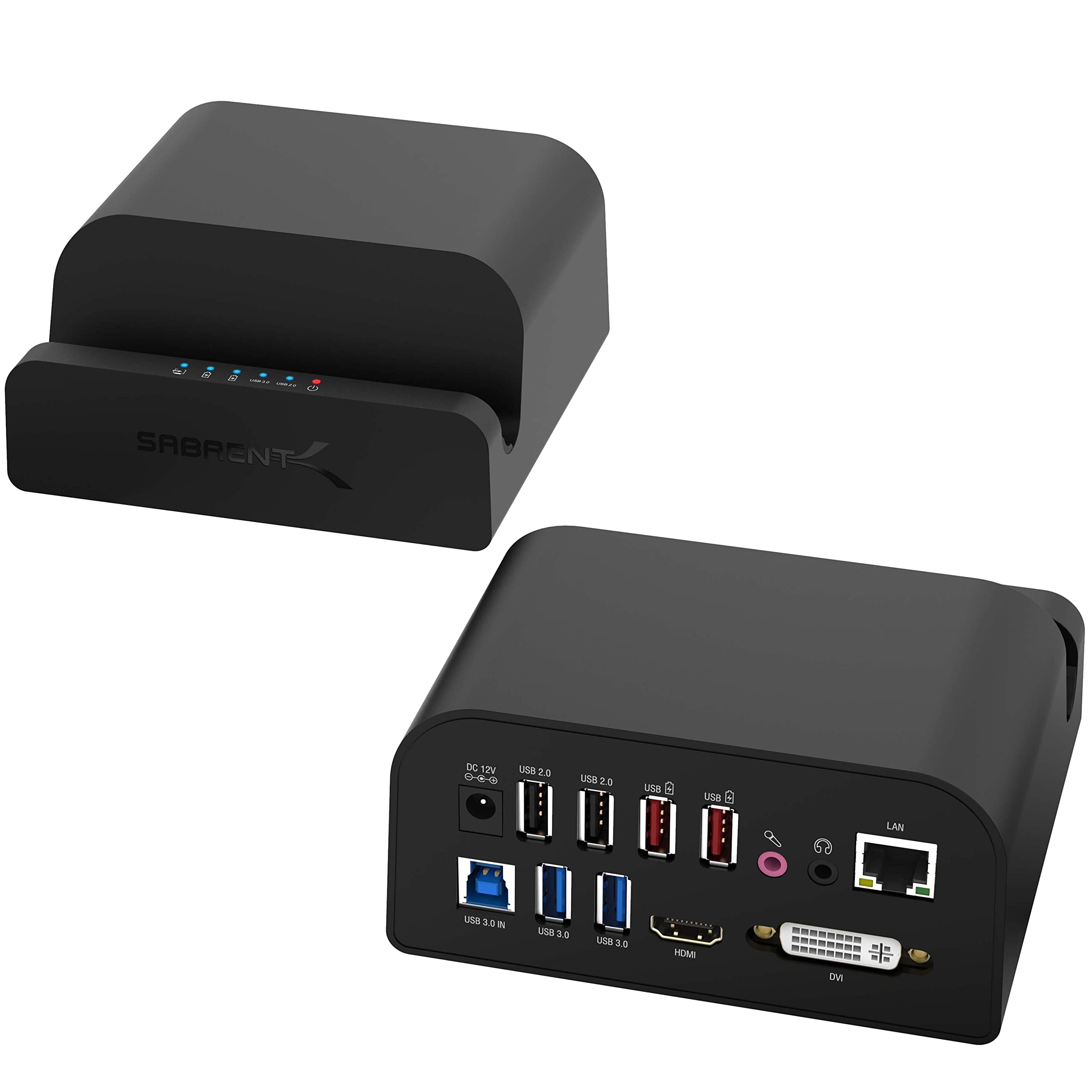
1,000+ ratings
Read Amazon ReviewsSABRENT DS-RICA USB 3.0 Universal Docking Station
A practical fit for laptop users seeking multiple display connections, wired Gigabit Ethernet, legacy USB ports, and device charging in one dock.
- Supports simultaneous HDMI and DVI displays.
- Includes a 10/100/1000 Gigabit Ethernet port.
- Provides two USB 3.0 ports and two USB 2.0 ports; listed transfer speeds are up to 5Gbps, 480Mbps, and 12Mbps across USB 3.0, 2.0, and 1.1 standards.
- Has two 2.4A fast charging ports for charging devices.

Pros
- Combines two display connections, wired Ethernet, USB ports, and audio connections in one desk-oriented dock.
- HDMI and DVI support simultaneous display use, accommodating a mix of monitor inputs.
Consider before buying
- The macOS 10.13.4 compatibility note describes an external-display problem and a limited beta-driver workaround; Mac buyers should verify their current setup before relying on multi-display use.
- The description does not specify display resolutions or refresh rates, so check that the intended monitors and workload are supported.
Read the full review summary
The DS-RICA brings together several everyday desk connections: simultaneous HDMI and DVI displays, a Gigabit Ethernet port, two USB 3.0 ports, two USB 2.0 ports, speaker and microphone connections, and two 2.4A charging ports.
That combination can reduce the number of separate adapters needed when connecting a compatible computer to a monitor, wired network, and common USB accessories.
It is best suited to someone who values a broad selection of ports and plans to leave the dock at a desk.
The macOS 10.13.4 note is a meaningful compatibility consideration: the product information describes a DisplayLink issue after that update, with one extended desktop available using a specified beta driver.
If your Mac relies on multiple external displays, confirm current compatibility for your exact system before buying.
The buying factors
SABRENT DS-RICA Scorecard
Editorial scores reflect listed features and buyer fit; they are not laboratory measurements or customer ratings.
Display flexibility
HDMI and DVI can be used simultaneously, giving the dock useful options for a multi-display desk.
Wired networking
The Gigabit Ethernet port supports a wired connection for compatible setups.
USB connectivity
Four ports span USB 3.0 and USB 2.0, with the description giving speeds up to 5Gbps for USB 3.0.
Device charging
Two 2.4A charging ports add dedicated charging options alongside the data ports.
Audio connections
Speaker and microphone connections are useful for a desk, although the description does not detail audio formats or controls.
Mac display confidence
The supplied compatibility note calls out a display issue with macOS 10.13.4 and describes a limited beta-driver workaround.
Key Features and Specifications of SABRENT DS-RICA
- Supports simultaneous HDMI and DVI displays.
- Includes a 10/100/1000 Gigabit Ethernet port.
- Provides two USB 3.0 ports and two USB 2.0 ports; listed transfer speeds are up to 5Gbps, 480Mbps, and 12Mbps across USB 3.0, 2.0, and 1.1 standards.
- Has two 2.4A fast charging ports for charging devices.
- Includes a speaker port and microphone jack.
- The macOS compatibility note identifies a DisplayLink display issue after version 10.13.4; it describes one extended desktop with a specified beta driver and says Ethernet and audio, where implemented, remain unaffected.
Pros and Cons of SABRENT DS-RICA
Pros
- Combines two display connections, wired Ethernet, USB ports, and audio connections in one desk-oriented dock.
- HDMI and DVI support simultaneous display use, accommodating a mix of monitor inputs.
- USB 3.0 and USB 2.0 ports provide options for newer and older peripherals.
- Two dedicated 2.4A charging ports help separate device charging from everyday peripheral connections.
Consider before buying
- The macOS 10.13.4 compatibility note describes an external-display problem and a limited beta-driver workaround; Mac buyers should verify their current setup before relying on multi-display use.
- The description does not specify display resolutions or refresh rates, so check that the intended monitors and workload are supported.
- The four data ports are split between USB 3.0 and USB 2.0, which may be limiting if several high-speed peripherals need simultaneous connections.
Who Should Buy SABRENT DS-RICA?
Good fit
Consider the SABRENT DS-RICA if your desk setup needs HDMI and DVI displays, wired Gigabit Ethernet, and a blend of USB 3.0 and USB 2.0 connections.
It is especially relevant when you want those functions gathered into one station rather than relying on several separate adapters.
The audio jacks and dedicated charging ports also add convenience for a stationary setup with speakers, a microphone, and devices that need charging.
Before choosing it, match the dock's display outputs to your monitors and check the relevant operating-system support, particularly if you use a Mac and depend on more than one external display.
Who should skip it
Look elsewhere if your purchase depends on assured multi-display operation on a Mac affected by the macOS 10.13.4 issue. The supplied compatibility note describes a limited beta-driver workaround, so confirm that it meets your specific needs before committing.
This may not suit a setup that needs more than two USB 3.0 data connections or requires clearly specified monitor resolution and refresh-rate support. Check those requirements against the dock before buying.
What the SABRENT DS-RICA Means for a Desk Setup
Two display outputs for mixed monitor setups
The ability to use HDMI and DVI simultaneously is a practical advantage when the two monitors at a desk do not share the same input.
The description does not give supported resolutions or refresh rates, so check those details against the monitors and computer you plan to connect.
Wired networking and a mix of USB ports
Gigabit Ethernet gives the setup a wired-network option, while two USB 3.0 ports provide the dock's faster listed data connections and two USB 2.0 ports cover compatible accessories.
Buyers with multiple external drives or other high-speed devices should consider whether two USB 3.0 ports are enough for their routine.
Charging and audio at the workstation
Two 2.4A charging ports can be useful for keeping devices powered at the desk, while the speaker port and microphone jack gather basic audio connections in the same station.
The description does not spell out audio features or charging behavior for particular devices, so match the ports to the equipment you intend to use.
Mac users should check display compatibility
The compatibility note calls out blank DisplayLink-connected displays after macOS 10.13.4 and describes a beta-driver option for extending one desktop.
Since that is a specific operating-system warning, Mac buyers should verify support for their current system and display plan before treating the dock as a multi-monitor solution.
Alternatives to SABRENT DS-RICA
Laptop Docking Stations alternative
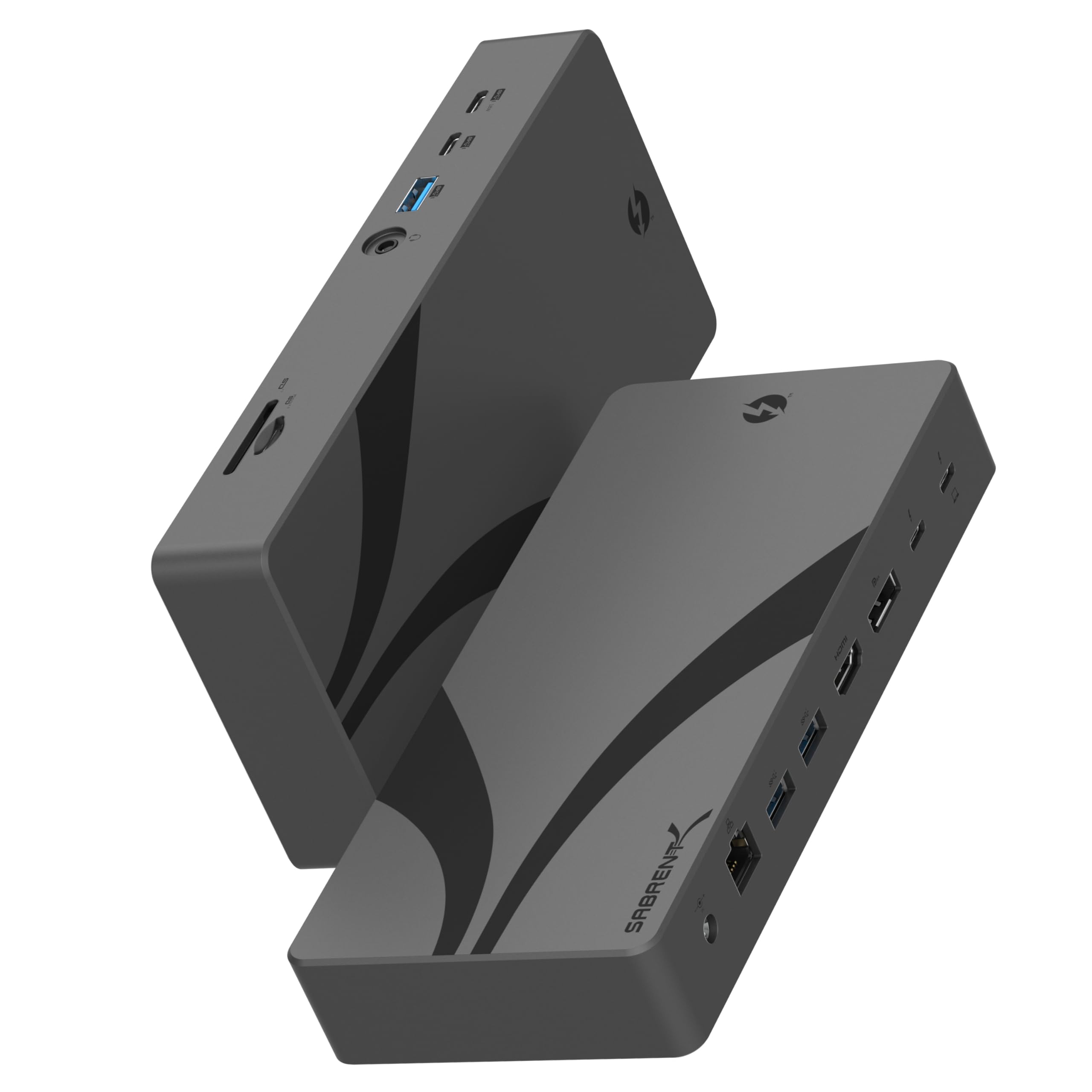
60+ ratings
Read Amazon ReviewsSABRENT Thunderbolt 4 Docking Station DS-T4MF
Choose the DS-RICA if its HDMI/DVI mix and simpler set of desk connections match your needs. Consider the DS-T4MF if your computer supports its Thunderbolt connection and you need the broader selection of display, USB, and card-reader options.
- The DS-T4MF uses Thunderbolt 4 and includes HDMI 2.1, DisplayPort 1.4, additional Thunderbolt ports, six USB ports across two speeds, Gigabit Ethernet, audio, and SD and microSD card readers.
- Its description specifies up to 40Gbps transfer speeds and multiple display modes, including dual displays up to 4K at 60Hz.
- The DS-RICA centers on HDMI and DVI display outputs, Gigabit Ethernet, two USB 3.0 ports, two USB 2.0 ports, audio connections, and two charging ports.
Laptop Docking Stations alternative
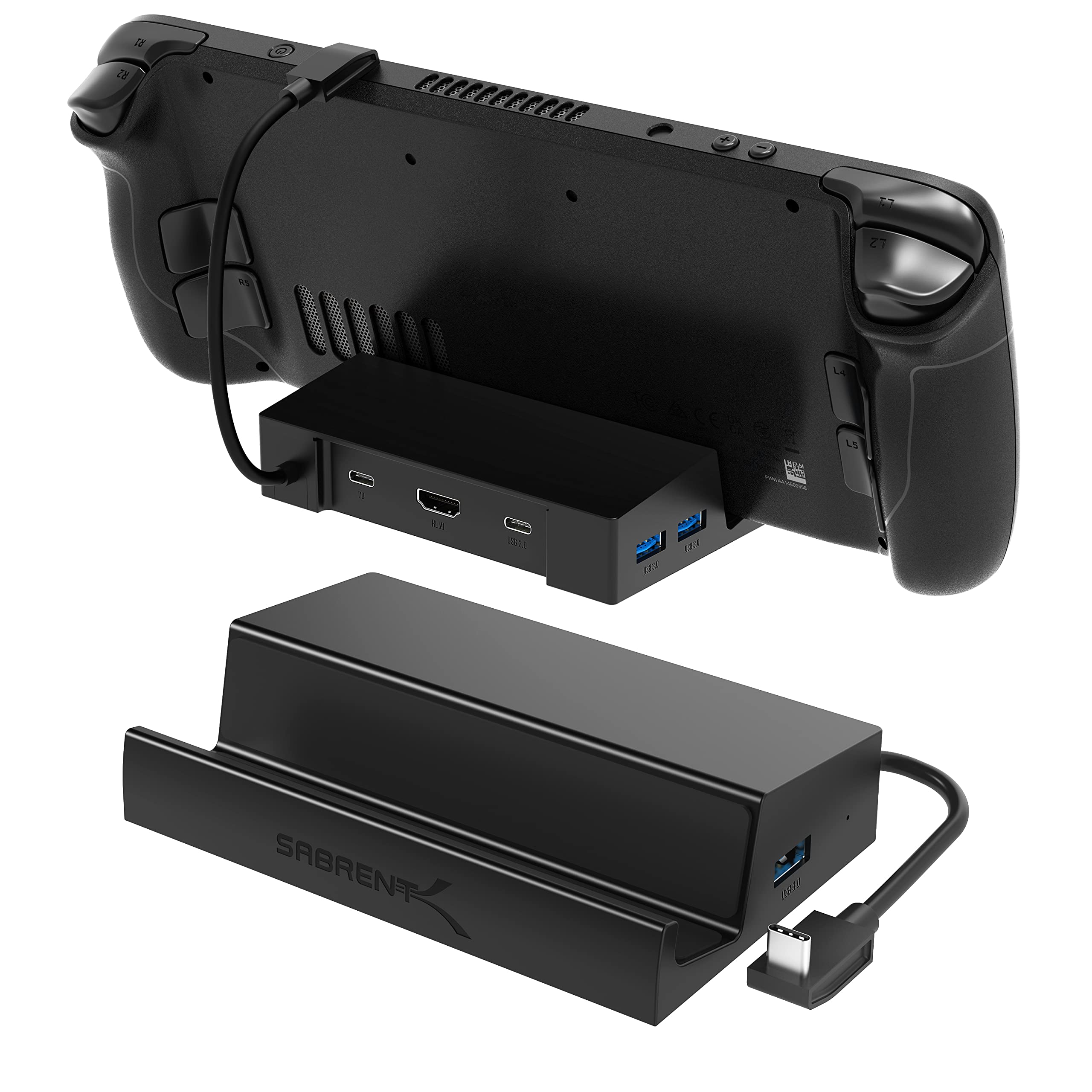
1,000+ ratings
Read Amazon ReviewsSABRENT 6-Port USB-C Dock for Steam Deck & ROG Ally DS-SD6P
The DS-SD6P is a closer fit for a portable USB-C device setup that prioritizes charging and USB peripherals. The DS-RICA is the more relevant choice when you need wired Ethernet, audio connections, and HDMI/DVI display options.
- The DS-SD6P is a compact USB-C dock designed for Steam Deck, ROG Ally, tablets, phones, and compatible laptops.
- It offers HDMI 2.0 output up to 4K at 60Hz, three USB-A 5Gbps ports, an extra USB-C data port, and up to 95W power delivery; its description says it does not include Ethernet.
- The DS-RICA's defining combination is HDMI and DVI display support with wired Gigabit Ethernet, audio jacks, USB 3.0 and 2.0 data ports, and two charging ports.
Is SABRENT DS-RICA Worth It?
The SABRENT DS-RICA is worth considering for a desk where HDMI and DVI monitors, wired Ethernet, a mix of USB devices, and dedicated charging ports are useful together.
Its range of connections makes it a practical hub for a compatible computer and monitor setup.
Check monitor requirements and operating-system compatibility before buying, with particular care if a Mac must run multiple external displays.
If its display behavior fits your system and the USB port mix is sufficient, the DS-RICA offers a focused set of everyday desk connections.
Your review at a glance
1,000+ ratings
Read Amazon ReviewsSABRENT DS-RICA USB 3.0 Universal Docking Station
A practical fit for laptop users seeking multiple display connections, wired Gigabit Ethernet, legacy USB ports, and device charging in one dock.
- Supports simultaneous HDMI and DVI displays.
- Includes a 10/100/1000 Gigabit Ethernet port.
- Provides two USB 3.0 ports and two USB 2.0 ports; listed transfer speeds are up to 5Gbps, 480Mbps, and 12Mbps across USB 3.0, 2.0, and 1.1 standards.
- Has two 2.4A fast charging ports for charging devices.